> ## Documentation Index
> Fetch the complete documentation index at: https://docs.spockoffice.com/llms.txt
> Use this file to discover all available pages before exploring further.
# Request on Behalf
> Learn how General Managers and Team Managers can submit leave requests for their team members through the Dashboard.
Managers can submit leave requests on behalf of their team members when needed. This feature is particularly useful for situations where employees are unable to submit requests themselves or when managers need to coordinate team schedules.
## Role Requirements
Can request leave on behalf of **all users** in the organization.
Can request leave on behalf of **team members** they directly manage.
Only users with General Manager or Team Manager roles can access the request-on-behalf functionality.
## How to Request Leave on Behalf
Navigate to the [Spock Dashboard](https://spockoffice.com/spockapp/request-leave/) and sign in.
Click on **Request Leave** in the dashboard navigation.
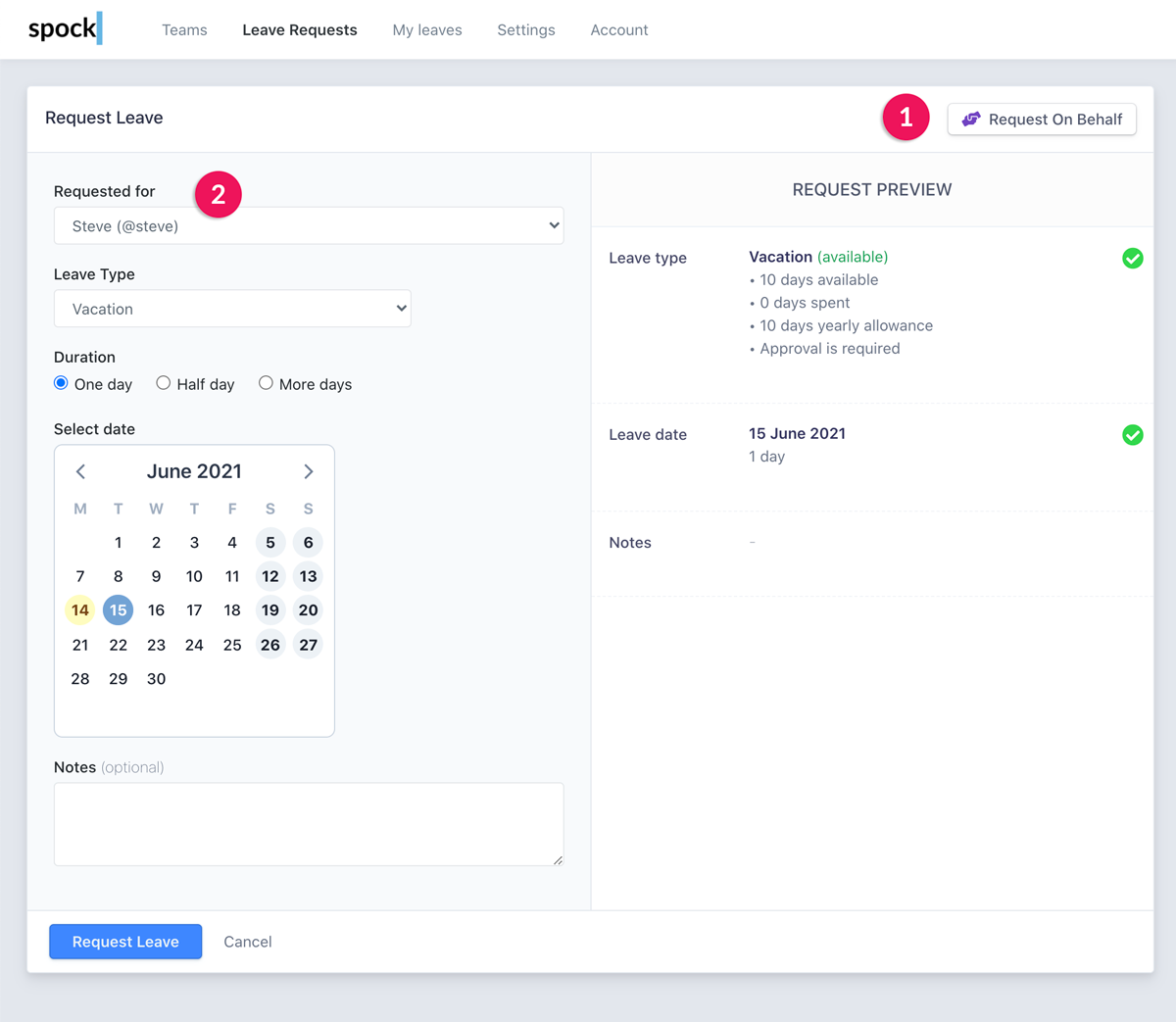
Click the **"Request on Behalf"** button to activate the proxy request feature.
A new field called **"Requested for"** will appear. Select the user for whom you want to submit the request.
Calendar events will automatically update according to the selected user's calendar settings.
Complete the leave request form with all necessary information:
* Leave type
* Duration and dates
* Notes (public and private)
* Substitute assignments
Submit the leave request on behalf of the employee.
 ## Automatic Approval Process
When you request leave that normally **requires approval**, the request is **automatically approved** because of your General Manager or Team Manager role.
This streamlined process ensures that managers can efficiently handle urgent leave situations without creating additional approval bottlenecks.
## Notification System
After successful submission:
1. **Spock automatically notifies** the employee for whom the request was submitted
2. The employee receives notification through their preferred communication channels
3. The leave appears in the employee's personal leave calendar and balance
## Best Practices
Always inform the employee beforehand when possible, even though they'll receive automatic notification after submission.
Use the private notes field to document the reason for submitting on behalf (e.g., "Employee called in sick", "Emergency situation").
Verify that the leave dates don't conflict with critical team activities or other scheduled absences.
Confirm with the employee that they received the notification and understand the leave details.
## Common Use Cases
When employees need immediate leave but cannot access Spock themselves
Submitting requests for employees who are too ill to handle the process
When technical problems prevent employees from submitting their own requests
Coordinating team schedules and managing overlapping leave periods
## Related Topics
Learn about the standard leave request process.
Understand the approval workflow for different leave types.
Manage user roles and team assignments.
Learn how to organize and manage teams in Spock.
Remember that requesting leave on behalf should be used responsibly and with the employee's knowledge whenever possible to maintain trust and transparency.
## Automatic Approval Process
When you request leave that normally **requires approval**, the request is **automatically approved** because of your General Manager or Team Manager role.
This streamlined process ensures that managers can efficiently handle urgent leave situations without creating additional approval bottlenecks.
## Notification System
After successful submission:
1. **Spock automatically notifies** the employee for whom the request was submitted
2. The employee receives notification through their preferred communication channels
3. The leave appears in the employee's personal leave calendar and balance
## Best Practices
Always inform the employee beforehand when possible, even though they'll receive automatic notification after submission.
Use the private notes field to document the reason for submitting on behalf (e.g., "Employee called in sick", "Emergency situation").
Verify that the leave dates don't conflict with critical team activities or other scheduled absences.
Confirm with the employee that they received the notification and understand the leave details.
## Common Use Cases
When employees need immediate leave but cannot access Spock themselves
Submitting requests for employees who are too ill to handle the process
When technical problems prevent employees from submitting their own requests
Coordinating team schedules and managing overlapping leave periods
## Related Topics
Learn about the standard leave request process.
Understand the approval workflow for different leave types.
Manage user roles and team assignments.
Learn how to organize and manage teams in Spock.
Remember that requesting leave on behalf should be used responsibly and with the employee's knowledge whenever possible to maintain trust and transparency.